Features:ASUS AI INTELLIGENCE - ASUS AI ADVISOR Using AI technology to understand natural-language questions or scenario descriptions, ASUS AI Advisor allows users to explore the functionality and advanced features of ASUS motherboards in a simple and straightforward way.
- ai OVERCLOCKING ASUS AI Overclocking profiles the CPU and cooling to predict the optimal configuration and push the system to its limits.
- ai cOOLING II Balance the thermals and acoustics of any build with a single click. --> Learn more >
- AI NETWORKING II AI Networking II combines intelligent technologies to continuously optimize network performance, provide trustworthy and seamless connectivity, and unleash the full speed of WiFi 7 . *Features may vary by model.
ASUS AI ADVISOR ASUS AI Advisor is an ASUS technical expert that's always available to answer your questions. Owners of compatible ASUS motherboards can interact with this AI-powered technology using natural language to learn more about their hardware. For DIY beginners, it can provide easy-to-understand explanations of one-click optimization features like AI Overclocking and AI Cooling II, and for seasoned PC-building veterans, it can offer guidance and instructions on the latest features offered by ASUS.
AI OVERCLOCKING ASUS AI Overclocking profiles the CPU and cooling to predict the optimal configuration and push the system to its limits. Predicted values can be engaged automatically or used as a launching ground for further experimentation.
What's New? As the first foray of AI Overclocking on an AMD architecture, the set of parameters has changed substantially, but voltage and clock speeds are still the primary targets for adjustment. Every core has a recommended VID and frequency, with the latter based on a combination of ratio and Asynchronous BCLK tuning.
Predictive settings in the utility are designed to work in tandem with Precision Boost Overdrive (PBO), but they go one step further by enhancing the values for EDC, TDC, and PPT, as well as tuning the curve optimizer.
Finally, by enabling the Dynamic OC Switcher, AI Overclocking ensures that the CPU is using ideal settings whether in single- or multi-threaded workloads.
AI COOLING II Balance the thermals and acoustics of any build with a single click. A proprietary ASUS algorithm slashes unnecessary noise while running a quick stress test, and then monitors CPU temperatures to dynamically adjust fans to optimal speeds.
Traffic Monitor Armoury Crate's Traffic Monitor tracks your current WiFi channel usage. Move to a less congested channel by clicking the "Channel Switch" button for improved network performance.
*The "Channel Switch" function requires pairing with an ASUS router. If not paired with an ASUS router, the channel change process can be performed in the "Router IP" section of the Traffic Monitor.
Fast Check Armoury Crate's Fast Check empowers users to rapidly detect WiFi signal strength.
Direction Finder Armoury Crate's Direction Finder helps users detect the optimal antenna orientation for achieving the best WiFi signal strength.
*The Direction Finder is only compatible with connections in the 5GHz and 6GHz bands
GameFirst GameFirst is now integrated into Armoury Crate for an even better user experience. GameFirst optimizes networking performance by allocating bandwidth in real time, based on intelligent algorithms designed for various application customizable usage scenarios and corresponding learning algorithms. The latest update includes dedicated support for NVIDIA GeForce NOW to ensure the lowest latency possible during intense game streamingcloud gaming sessions. To provide a better user's experience, GameFirst is now integrated into Armoury Crate.
Performance OVERCLOCKINGNPU BOOST The integrated NPU in Intel Core Ultra Processors (Series 2) efficiently accelerates AI workflows - and NPU Boost lets you do more with it. This BIOS feature overclocks the NPU with just one click, increasing performance by up to 24%.
Performance MEMORY- DDR5 DOMINATION Enhanced signal routing can push enthusiast-grade kits well beyond the 9 GT/s threshold on the Strix Z890-A. --> Learn more >
- DIMM FIT DIMM Fit is an ASUS-exclusive BIOS feature that precisely analyzes individual memory modules to optimize performance and pinpoint potential issues. --> Learn more >
- AEMP III ASUS Enhanced Memory Profile III (AEMP III) is an advanced firmware feature that empowers users to achieve unparalleled memory performance with cutting-edge CUDIMM memory. --> Learn more >
- DIMM FLEX DIMM Flex provides enthusiasts with a powerful new way to overclock their DDR5 memory modules. --> Learn more >
DDR5 Strength ROG has a rich history of delivering top-tier memory performance, and DDR5 is no exception. Enhanced signal routing can push enthusiast-grade kits well beyond the 9 GT/s threshold on the Strix Z890-A, with even greater speeds on the horizon. For experienced users, the UEFI offers a wide range of options to fine-tune and push performance to its limits.
DIMM FIT DIMM Fit is an ASUS-exclusive BIOS feature that precisely analyzes individual memory modules to optimize performance and pinpoint potential issues. This offers peak efficiency, compatibility, and system stability.
Whether you are an overclocker seeking ultimate performance, a competitor pursuing the most responsive gameplay, or a content creator prioritizing rock-solid stability, DIMM Fit provides optimizations tailored to your needs and your hardware configuration.
AEMP III ASUS Enhanced Memory Profile III (AEMP III) is an advanced firmware feature that empowers users to achieve unparalleled memory performance with cutting-edge CUDIMM memory. Through a two-phase comprehensive tuning process, AEMP III first optimizes the clock driver and then the memory frequency. This results in the best balance between performance and stability, even at cutting-edge speeds of DDR5-8000 or higher.
DIMM FLEX DIMM Flex provides enthusiasts with a powerful new way to overclock their DDR5 memory modules. It employs specialized circuitry that can boost performance or address potential stability issues, depending on temperature readings. When temperatures are nominal, it can use the extra headroom to increase speeds and efficiency. And when temperatures increase, it can adjust memory behavior downward to maintain stability.
ASUS WiFi Q-Antenna Dual transceivers support the 2.4, 5 and 6 GHz bands to enable faster throughput, with directional sensitivity to improve signal quality and cover greater distances.
Intel 2.5Gb Ethernet Onboard Intel 2.5Gb Ethernet gives your wired connection a boost, with speeds that are 2.5 times faster than standard Ethernet connections for speedy file transfers, low-latency gaming, and high-res video streaming.
PCIE 5.0 The Strix Z890-A offers end-to-end PCIe 5.0 support, and the topmost x16 expansion slot is protected with a SafeSlot retention bracket to bear the weight of the latest graphics cards. One onboard M.2 slot is rated for blistering read and write speeds up to 16 GB/s, while the remainder can deliver still-impressive 8 GB/s transfers. And every M.2 slot is covered with substantial heatsinks to dispatch the heat of next-gen drives.
DOLBY ATMOS ROG and Dolby have partnered to bring superior gaming audio quality to users. Dolby Atmos expands on traditional surround sound systems by adding height channels, which enables immersive three-dimensional audio to be perceived from above, below and around the listener.
SupremeFX ROG SupremeFX is a unique blend of hardware and software technologies that provide superior audio. The Strix Z890-A implementation features the ALC4080 codec for high-resolution playback up to 32-bit/384 kHz across all channels. Front-panel output is streamed through the integrated Savitech amplifier that can drive high-fidelity acoustics to a wide variety of speakers and headsets.
AUDIO LINE SHIELDING
- SAVITECH SV3H712 AMPLIFIER
- ALC4080 CODEC
- AUDIO COVER
- PREMIUM AUDIO CAPACITORS
- A specially designed circuit separation reduces electromagnetic interference from the motherboard and attached devices for cleaner audio.
- The integrated Hi-Fi Savitech amplifier holds up its end of the signal path with imperceptible levels of distortion at -90dB THD+N and a signal-to-noise ratio of 110dB for extremely clean output.
- Instead of the conventional high definition audio (HDA) interface, the ALC4080 codec uses a USB interface to deliver studio-level sound reaching up to 32-bit 384 kHz audio resolution.
- A metal cover protects against electromagnetic interference, preserving the integrity of audio signals to ensure the best sound quality.
- High-quality components produce a warmer, more natural sound with exceptional clarity and fidelity.
EZ PC DIY - M.2 Q-Release Effortless installation, hassle-free setup. -->
- M.2 Q-Slide A simple locking mechanism to secure the drive and neatly eliminate traditional screws. -->
- New M.2 Q-LATCH Troubleshooting common boot problems and hardware issues. -->
- PCIE SLOT Q-RELEASE SLIM A physical button unlocks the first PCIe slot's security latch with one tap -->
- Q-Antenna Safe and simple tool to update BIOS or reset it. -->
- Q-LED A simple locking mechanism to secure the drive and neatly eliminate traditional screws. -->
PCIE SLOT Q-RELEASE SLIM With PCIe Slot Q-Release Slim, simply tilt the card toward the latching mechanism to automatically unlock it from the PCIe slot. This makes upgrades and maintenance easier than ever before. Users will no longer need to fiddle with a tricky latch or even press a button to releas
Specifications:
| ©2026 Respective owners and brand holders. This table has been carefully researched and generated by ComXpert International CC (//www.comx.co.za), however, errors and omissions may occur. Only references to South Africa apply. All products are sourced in South Africa from the official suppliers and the warranty is that of the local supplier. E&OE. This table and our site's content may be used on condition that this notice and link remains intact and unaltered. |
Specifications |
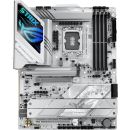
| Product Code | ASUS ROG STRIX Z890-A GAMING WIFI |
| CPU | Support Intel Core Ultra Processors (Series 2) |
| Supports Intel Turbo Boost Technology 2.0 and Intel Turbo Boost Max Technology 3.0 |
| ** Intel Turbo Boost Max Technology 3.0 support depends on the CPU types. |
| Chipset | Intel Z890 Chipset |
| Memory | 4 x DIMM slots, max. 192GB, DDR5 |
| Support up to 9066+MT/s (OC), Non-ECC, Un-buffered, Clocked Unbuffered DIMM (CUDIMM) |
| Dual channel memory architecture |
| Supports Intel Extreme Memory Profile (XMP) memory module |
| Supports DIMM Flex |
| Supports DIMM FIT |
| ASUS Enhanced Memory Profile III (AEMPIII) |
| * Non-ECC, un-buffered DDR5 memory supports On-Die ECC function. |
| Graphics | 1 x DisplayPort |
| 1 x HDMI port |
| 2 x Intel Thunderbolt 4 support DisplayPort and Thunderbolt video outputs |
| - Graphics specifications may vary between CPU types. |
| * Supports max. 8K@60Hz as specified in DisplayPort 1.4. |
| ** Supports 4K@60Hz as specified in HDMI 2.1. |
| * In Thunderbolt 4 mode, supports up to 8K@60Hz x1 with DSC or 4K@60Hz x 2, maximum total bandwidth up to 23.8Gbps or 16Gbps/16Gbps, for resolution support please check DisplayPort 2.1 specs. In DP alt mode, supports up to UHBR20. |
| ** VGA resolution support depends on processors' or graphic cards' resolution. |
| *** While installing the operating system, please ensure that your monitor is connected to the HDMI port on the back I/O panel or to a discrete graphics card. |
| Expansion Slots | Intel Core Ultra Processors (Series 2) |
| 1 x PCIe 5.0 x16 slot |
| Intel Z890 Chipset |
| 1 x PCIe 4.0 x16 slot (supports x4 mode) |
| Storage | Total Supports 5 x M.2 slots and 4 x SATA 6Gb/s ports |
| Intel Core Ultra Processors (Series 2) |
| M.2_1 slot (Key M), type 2242 / 2260 / 2280 / 22110 (supports PCIe 5.0 x4 mode) |
| M.2_2 slot (Key M), type 2280 (supports PCIe 4.0 x4 mode) |
| Intel Z890 Chipset |
| M.2_3 slot (Key M), type 2280 (supports PCIe 4.0 x4 mode) |
| M.2_4 slot (Key M), type 2280/22110 (supports PCIe 4.0 x4 mode) |
| M.2_5 slot (Key M), type 2242/2260/2280 (supports PCIe 4.0 x4 & SATA modes) |
| 4 x SATA 6Gb/s ports |
| * Intel Rapid Storage Technology supports PCIe RAID 0 / 1 / 5 / 10, SATA RAID 0 / 1 / 5 / 10, M.2 slot from CPU only supports RAID 0/1/5. |
| Ethernet | 1 x Intel 2.5Gb Ethernet |
| ASUS LANGuard |
| Wireless & Bluetooth | Wi-Fi 7 |
| 2x2 Wi-Fi 7 (802.11be) |
| Supports 2.4/5/6GHz frequency band |
| Supports Wi-Fi 7 320MHz bandwidth, up to 5.8Gbps transfer rate. |
| Bluetooth v5.4 |
| *Wi-Fi features may vary depending on the operating system |
| For Windows 11, Wi-Fi 7 will require 24H2 or later version for full functions, Windows 11 21H2/22H2/23H2 only supports Wi-Fi 6E. |
| For Windows 10, only Wi-Fi 6 is supported. |
| ** Wi-Fi 6GHz frequency band and bandwidth regulatory may vary between countries. |
| * The Bluetooth version may vary, please refer to the Wi-Fi module manufacturer's website for the latest specifications. |
| USB | Rear USB (Total 10 ports) |
| 2 x Thunderbolt 4 ports (2 x USB Type-C ) |
| 6 x USB 10Gbps ports (5 x Type-A + 1 x USB Type-C with up to 30W PD/PPS Fast-charge) |
| 2 x USB 5Gbps ports (2 x Type-A) |
| Front USB (Total 7 ports) |
| 1 x USB 20Gbps connector (supports USB Type-C ) |
| 1 x USB 5Gbps header supports 2 additional USB 5Gbps ports |
| 2 x USB 2.0 headers support 4 additional USB 2.0 ports |
| * USB Type-C power delivery output: max. 5V/3A |
| ** USB Type-C power delivery output: 5V/9V max. 3A, 12V max 2.5A, 15V max. 2.0A |
| Audio | ROG SupremeFX 7.1 Surround Sound High Definition Audio CODEC ALC4080 |
| - Impedance sense for front and rear headphone outputs |
| - Supports: Jack-detection, Multi-streaming, Front Panel MIC Jack-retasking |
| - High quality 120 dB SNR stereo playback output and 110 dB SNR recording input |
| - Supports up to 32-Bit/384 kHz playback on front panel |
| Audio Features |
| - SupremeFX Shielding Technology |
| - Savitech SV3H712 AMP |
| - Rear optical S/PDIF out port |
| - Premium audio capacitors |
| - Audio cover |
| * A chassis with an HD audio module in the front panel is required to support 7.1 Surround Sound audio output. |
| ** The LINE OUT port on the rear panel does not support spatial audio. If you wish to use spatial audio, make sure to connect your audio output device to the audio jack on the front panel of your chassis or use a USB interface audio device. |
| Back Panel I/O Ports | 2 x Thunderbolt 4 ports (2 x USB Type-C ) |
| 6 x USB 10Gbps ports (5 x Type-A + 1 x USB Type-C with up to 30W PD/PPD Fast-charge) |
| 2 x USB 5Gbps ports (2 x Type-A) |
| 1 x DisplayPort |
| 1 x HDMI port |
| 1 x Wi-Fi module |
| 1 x Intel 2.5Gb Ethernet port |
| 2 x Audio jacks |
| 1 x Optical S/PDIF out port |
| 1 x BIOS FlashBack button |
| 1 x Clear CMOS button |
| Internal I/O Connectors | Fan and Cooling Related |
| 1 x 4-pin CPU Fan header |
| 1 x 4-pin CPU OPT Fan header |
| 1 x 4-pin AIO Pump header |
| 5 x 4-pin Chassis Fan headers |
| Power Related |
| 1 x 24-pin Main Power connector |
| 2 x 8-pin +12V CPU Power connectors |
| Storage Related |
| 5 x M.2 slots (Key M) |
| 4 x SATA 6Gb/s ports |
| USB |
| 1 x USB 20Gbps connector (supports USB Type-C ) |
| 1 x USB 5Gbps header supports 2 additional USB 5Gbps ports |
| 2 x USB 2.0 headers support 4 additional USB 2.0 ports |
| Miscellaneous |
| 3 x Addressable Gen 2 headers |
| 1 x Chassis Intrusion header |
| 1 x CPU Over voltage jumper |
| 1 x Front Panel Audio header (F_AUDIO) |
| 1 x Start button |
| 1 x 10⁻¹ pin Front System Panel header |
| 1 x Thermal Sensor header |
| 1 x Thunderbolt (USB4 ) header |
| Special Features | Extreme Engine Digi+ |
| - 5K Black metallic capacitors |
| ASUS Q-Design |
| - M.2 Q-Latch |
| - M.2 Q-Release |
| - M.2 Q-Slide |
| - PCIe Slot Q-Release Slim (with PCIe SafeSlot) |
| - Q-Antenna |
| - Q-Dashboard |
| - Q-DIMM- Q-LED (CPU [red], DRAM [yellow], VGA [white], Boot Device [yellow green]) |
| - Q-SlotASUS |
| Thermal Solution |
| - M.2 heatsink backplate |
| - M.2 heatsink |
| ASUS EZ DIY |
| - BIOS FlashBack button |
| - BIOS FlashBack LED |
| - Clear CMOS button |
| - CPU Socket lever protector |
| - ProCool II |
| - Pre-mounted I/O shield |
| - SafeSlot |
| - SafeDIMM |
| Aura Sync |
| - Addressable Gen 2 headers |
| Software Features | ROG Exclusive Software |
| - ROG CPU-Z |
| - Dolby Atmos |
| ASUS Exclusive Software |
| Armoury Crate |
| - Aura Creator |
| - Aura Sync |
| - Fan Xpert 4 (with AI Cooling II) |
| - GameFirst |
| - Power Saving |
| AIDA64 Extreme (60 days free trial) |
| HWiNFO |
| ASUS AI Advisor |
| ASUS DriverHub |
| ASUS GlideX |
| USB Wattage Watcher |
| TurboV Core |
| Adobe Creative Cloud (30 Days Free Trial) |
| Norton 360 for Gamers (60 Days Free Trial) |
| WinRAR (40 Days Free Trial) |
| UEFI BIOS |
| AI Overclocking Guide |
| NPU Boost |
| ASUS EZ DIY |
| - ASUS CrashFree BIOS 3 |
| - ASUS EZ Flash |
| - ASUS UEFI BIOS EZ Mode |
| - ASUS MyHotkey |
| FlexKey |
| BIOS | 256 Mb UEFI AMI BIOS |
| Manageability | WOL by PME, PXE |
| Accessories | Cables |
| 2 x SATA 6Gb/s cables |
| Additional Cooling Kit |
| 1 x Thermal pad for M.2 22110 |
| Miscellaneous |
| 1 x ASUS WiFi Q-Antenna |
| 1 x Cable ties package |
| 1 x M.2 Q-Latch package |
| 1 x ROG key chain |
| 1 x ROG Strix stickers |
| 5 x M.2 rubbers |
| Documentation |
| 1 x Quick start guide |
| Operating System | Windows 11 (22H2 later) |
| Form Factor | ATX Form Factor |







 Up
Up Down
Down


 Mobile store